
Why Is Your Business Alarm Beeping? What the Trouble Light Is Telling You
Security Cameras Dallas Team
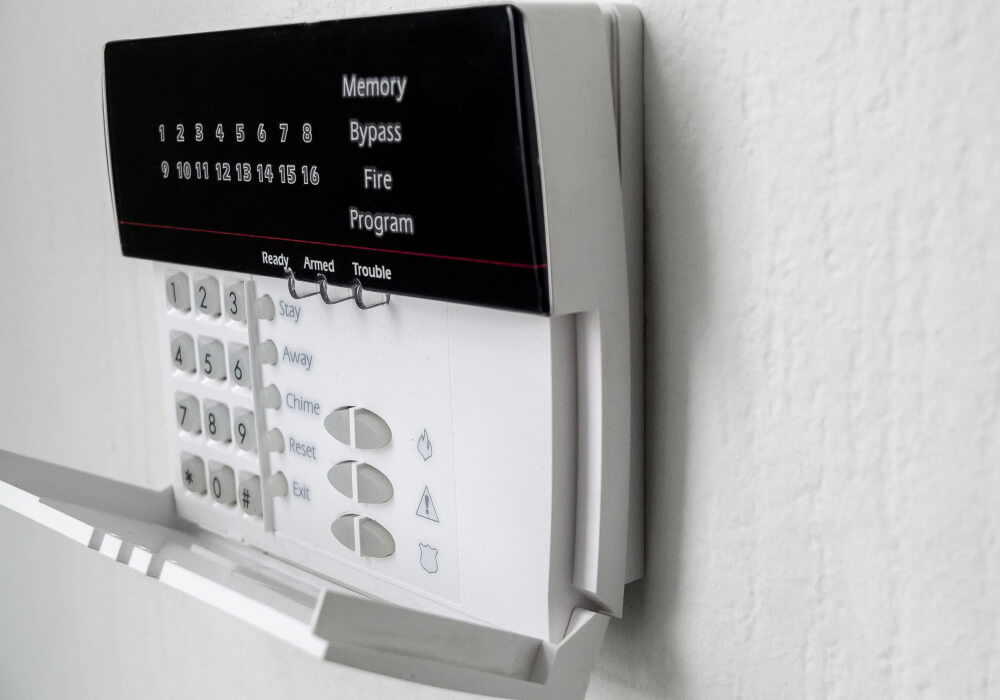
The manager opening your business on Monday morning finds the keypad by the back door beeping, and silencing it only stops the sound for a few hours. Nothing was broken into, the doors are secure, and the system still arms and disarms the way it always has. There is only a lit triangle in the corner of the display.
Silencing the keypad stops the beeping, but it does not clear the trouble that caused it. A commercial alarm panel continually checks its power, backup battery, communication path and connected devices. The trouble light comes on when the panel detects a problem with one of them. Some of what it reports is maintenance you can schedule around your week. Some of it means an alarm at that building is no longer reaching anyone.
What a commercial panel is usually reporting when the trouble light comes on
Alarm panels can report many different trouble conditions, but businesses regularly encounter the five listed below. The exact message helps narrow the problem to the panel, its communication path or a particular device.
- AC loss: the panel has lost its normal power and is running on the backup battery in the enclosure.
- Low battery: either the battery inside the panel is weak, or the battery inside one wireless device is.
- Communication failure: the panel cannot get a signal through to the monitoring center.
- Zone trouble: the panel has stopped hearing from a sensor it expects to hear from.
- Tamper: a cover or housing has been opened on a device, a keypad, or the panel itself.
The difference between an alarm and a trouble
An alarm means a door contact, motion detector, glass break sensor or another device has reported an event. A trouble means the system has found a problem with its power, battery, communication path, wiring or one of those devices. The two are reported differently, and the display tells you which one you have.
- On a DSC PowerSeries Neo: most conditions turn on the trouble indicator and the keypad beeps twice every ten seconds, though AC power faults may behave differently.
- On a Honeywell Vista: the condition is written out in plain words on the alpha display.
- On many monitored systems: the same condition also reaches you through the monitoring service or an app, so the keypad is not always the first place you see it.
AC loss, and what it means when the power is already back
A Honeywell Vista shows AC LOSS or NO AC. A DSC Neo reports an AC trouble. Either way the panel has lost the power it normally runs on and is drawing from the sealed battery inside the enclosure. The cause is usually somewhere between the breaker and the alarm rather than inside the panel.
- A tripped breaker: the alarm often shares a circuit with something nobody uses, so the breaker goes and nobody notices for days.
- An unplugged or failed transformer: a plug-in transformer gets moved so a floor machine or a heater can borrow the outlet, and it never goes back.
- A switched outlet: if the receptacle is wired to a wall switch, the panel loses power at close every night and finds it again in the morning.
- A tripped GFCI: one reset button in a back room can take the whole run with it.
What surprises people is that the trouble often stays lit for hours after the power comes back. The battery may still be recharging, and the condition can remain until the panel tests it again and sees an acceptable voltage. If the power has clearly been on for a day and the light is still there, the battery rather than the power is where to look.
Low battery on the panel, and low battery on a device
Two low battery conditions exist and they are not the same problem. A weak panel battery reduces the backup power available during an outage. A low battery in a wireless device affects that particular contact, detector, keypad or key fob, so the wording and zone information on the display matter.
- System or panel low battery: Honeywell shows SYSTEM LO BAT and DSC reports a battery trouble. This is the sealed lead-acid battery in the main enclosure, which supplies temporary backup power when normal AC power is lost.
- Device low battery: Honeywell shows LO BAT with the zone descriptor and DSC reports a device battery. This is the cell inside one wireless contact, motion detector, or keyfob, and only that device is affected.
Sealed lead-acid batteries lose capacity as they age, and most get replaced somewhere between three and five years. Heat and repeated power outages can shorten battery life, particularly when the panel is in an electrical closet, on a warehouse mezzanine or in an unconditioned back room. A battery that has carried the system through several outages may need replacement sooner. Battery replacement is normally handled during a scheduled service visit, which is also when a technician confirms the panel accepts the new battery and clears the condition. On most accounts it is part of ongoing business alarm installation and monitoring rather than a separate call.
Communication failure, and why the signal stops reaching the monitoring center
Honeywell shows COMM FAILURE or FC, and TELCO FAULT when the problem is on the phone line. DSC reports a communications trouble. The system may still detect activity and sound locally, but the monitoring center may not receive the signal. Communication failures often appear after a business changes its phone service, internet connection, network settings or cellular communicator.
- The phone line changed: a phone system upgrade ported the copper line or converted it to VoIP, and nobody thought to mention the alarm.
- The internet changed: a new provider came in, or the router was swapped and the panel never got reconnected.
- The network changed: a new IP scheme or a firewall rule now blocks the path the panel was using.
- The cellular network changed: an older radio goes off the air when a carrier retires a network, while nothing at the building has been touched.
How quickly the system notices depends on the panel, the communicator and the supervision settings. Some report the loss quickly. Other communicators may not report the failure until the next supervised check or attempted signal, depending on how the system is configured. Because a single reporting path can fail quietly, some businesses add live video monitoring for commercial properties so an event is seen as well as signaled.
Expert Tip
Write down the exact wording on the display before anyone clears the condition. The keypad shows what is active at that moment, and the message may disappear once the fault clears. A photo preserves the wording, even when the panel still holds an event history a technician can pull later.
Zone trouble, tamper, and sensors that stopped reporting
Honeywell shows CHECK with a zone number, and DSC separates device faults from device and module tampers. In each case the panel has stopped hearing from a device it expects to hear from, or it has seen a housing come open. The cause may be a battery, damaged wiring, a loose cover or a device that is no longer communicating with the panel.
- A contact out of alignment: a back door sagged over the summer and no longer lines up with its magnet.
- A wireless device that quit transmitting: the battery died, or the device stopped checking in.
- A cover removed: a motion detector or keypad lost its housing during painting or cleaning.
- Damaged wiring: a cable got pinched or cut during construction, or new equipment is putting out enough interference to bother a wireless receiver.
- A separate bell or siren circuit trouble: some panels report this on its own, and it matters because the alarm may not sound properly at the building.
A tamper message may simply mean that a device cover has been removed or is not seated properly. Check the device named on the keypad before assuming that the panel itself has failed.
Which conditions can wait for a service visit, and which cannot
A trouble light on Friday afternoon forces a decision, because not all of these carry the same risk. Some leave the building fully covered while you wait for a scheduled visit. Other conditions mean the system is running on backup power or may no longer be reporting to the monitoring center, so they need attention sooner.
- Communication failure: the system may still sound locally, but the monitoring center may not receive the alarm. Contact your monitoring provider or alarm company as soon as you see this message.
- AC loss: the system is on its backup battery, and how long it keeps running depends on the condition of that battery and the amount of equipment it is powering.
- AC loss with a low battery showing: the two together are worse than either alone, because the reserve is already reduced.
- Zone trouble: the named sensor may not report correctly, leaving that door or area without its normal level of protection.
- Tamper: a housing is open or damaged, and it is worth looking at before anything is assumed.
- A single device low battery: usually less urgent, and the device may keep working for a while, but replace the battery before it fails.
What you can check yourself before you call a technician
Some trouble conditions can be traced to a breaker, an unplugged transformer or a recently changed device. Even when the cause is not obvious, recording the keypad message and noting recent changes at the property gives the technician useful information. Four checks are worth doing first.
- Read the trouble and record the exact wording: on many DSC keypads, press [*][2] to view the active trouble condition, though some systems require an access code or use a different sequence. On a Honeywell alpha keypad the condition is on the display.
- Check the breaker, then the transformer: it is often behind a copier or a stack of boxes, so confirm it is plugged in, seated firmly, and on an outlet that no wall switch controls, and reset a GFCI if one has tripped.
- Think back over the last month or two: a phone system upgrade, a new internet provider, construction work, a rehung door, or a delivery that clipped a conduit accounts for a good number of these.
- Look at the zone the panel names: go to that door or that device before assuming the panel is wrong.
Beyond those checks, the work belongs with a technician. Do not open the panel enclosure, and do not disconnect the battery on a monitored system until the monitoring center has put your account on test, because that work sends signals and can bring a response you did not intend. Have a technician out when the trouble involves the communication path, when a low battery comes back after a fresh battery has gone in, when a zone fault keeps returning after the door and the device have both been checked, or when the display shows something you cannot make sense of.
Ready to find out what your panel is reporting?
When a trouble condition keeps returning, the event history in the panel can help identify when it started and which faults were recorded. Security Cameras Dallas installs, services, and monitors commercial alarm systems across the Dallas area, and can pull the event log, test the reporting path end to end, and identify the reported fault and what needs to be repaired.
Common questions about alarm trouble conditions
How do I stop my alarm keypad from beeping?
Use the trouble silence command for your keypad. On many DSC keypads, pressing # silences the beeping, while other systems may require your code or an OFF command. This stops the sound only. The trouble remains until the underlying problem is corrected.
Does a trouble light mean my alarm will not work?
Not necessarily, but it depends on the trouble. The system may still arm while a communication path, sensor, siren circuit or backup battery is not working properly. Read the exact message rather than assuming the rest of the system is fully protected.